

Is your Whirlpool range oven suddenly not working when you need it the most? It’s frustrating, especially when mealtime is ticking closer and you’re counting on your oven to deliver.
But don’t worry—you’re not alone, and there are simple steps you can take to get your oven back in action quickly. You’ll discover common reasons why your Whirlpool range oven might stop working and easy fixes you can try yourself.
Keep reading to save time, avoid costly repairs, and get your kitchen running smoothly again.
Common Whirlpool Range Oven Issues
Whirlpool range ovens are popular for their features and design. Sometimes, these ovens stop working as expected. Knowing common issues can help you fix them or call for repair.
This guide covers four common problems you might face with Whirlpool range ovens.
Oven Won’t Heat
If your oven does not heat up at all, it can be frustrating. This problem often comes from electrical or heating element issues.
Check if the oven is plugged in and the circuit breaker is on. If these are fine, the heating element might be broken and need replacement.
Inconsistent Temperature
The oven heats but the temperature changes a lot during cooking. This can cause food to cook unevenly.
A faulty temperature sensor or bad oven thermostat can cause this issue. Cleaning the sensor or replacing it may fix the problem.
Control Panel Not Responding
The control panel may stop working or ignore your commands. This stops you from setting cooking modes or temperatures.
Try resetting the oven by unplugging it for a few minutes. If the panel still does not respond, the control board might need repair or replacement.
Self-cleaning Cycle Problems
The self-cleaning feature may not start or stop before finishing. This can leave dirt or cause bad smells.
Check if the door locks properly during cleaning. A door lock failure or faulty timer can stop the cycle. Repairing these parts usually solves the problem.

Credit: www.repairclinic.com
Quick Fixes For Power Problems
If your Whirlpool range oven is not working, power issues might be the cause. Simple checks can help fix the problem fast.
This guide shows quick fixes for common power problems with your oven. You can try them before calling a technician.
Checking The Power Supply
Make sure your oven is plugged into a working power outlet. Sometimes, the outlet may have no power, causing the oven to stay off.
Test the outlet by plugging in a small device like a lamp. If it does not turn on, the outlet may be faulty or have no power.
- Unplug the oven from the outlet
- Plug in a different device to test power
- If no power, try another outlet
Resetting The Circuit Breaker
Your oven might not get power if the circuit breaker has tripped. Resetting it can restore electricity to the oven.
Look in your home’s breaker box and find the switch for the kitchen or oven. Flip it off and then back on to reset.
- Open the breaker box panel
- Find the oven or kitchen circuit breaker
- Switch it off, wait 10 seconds
- Switch it back on
- Check if the oven powers on
Inspecting The Power Cord
Check the power cord of your oven for any damage or loose connections. A broken cord can stop the oven from working.
Look for cuts, frays, or bends in the cord. Make sure it is plugged in tightly and not loose.
- Unplug the oven from the outlet
- Examine the entire length of the cord
- Look for visible damage or wear
- Plug the cord back in firmly
- Replace the cord if it is damaged
Troubleshooting Heating Issues
A Whirlpool range oven may stop heating properly for several reasons. Fixing the problem requires checking key parts that control heat.
This guide covers how to test the heating element, examine the thermal fuse, and replace the temperature sensor.
Testing The Heating Element
The heating element creates the heat inside the oven. If it is broken, the oven will not heat up.
To test the element, first unplug the oven. Remove the element and use a multimeter to check for continuity. No continuity means the element is faulty.
- Unplug the oven from power
- Remove the heating element carefully
- Set multimeter to continuity mode
- Touch probes to both ends of the element
- If no beep or reading, replace the element
Examining The Thermal Fuse
The thermal fuse protects the oven from overheating. If it blows, the oven stops heating for safety.
Test the thermal fuse with a multimeter. Remove it from the oven, then check for continuity. No continuity means the fuse is bad and needs replacement.
- Turn off power to the oven
- Locate the thermal fuse inside the oven panel
- Remove the fuse carefully
- Use a multimeter to test continuity
- Replace if the fuse has no continuity
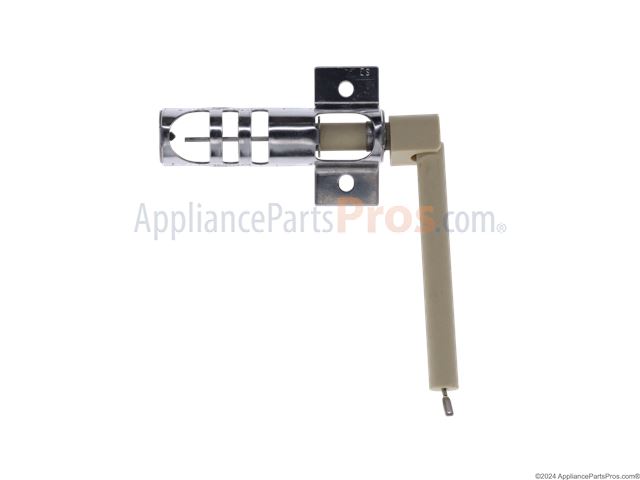
Replacing The Temperature Sensor
The temperature sensor tells the oven how hot it is inside. A bad sensor can cause wrong temperature readings and no heat.
To replace the sensor, first unplug the oven. Then disconnect the sensor wires and remove it. Install the new sensor and reconnect the wires.
- Unplug the oven from power
- Find the temperature sensor inside the oven cavity
- Disconnect the wiring harness
- Unscrew and remove the old sensor
- Attach and screw in the new sensor
- Reconnect the wiring
Credit: www.appliancepartspros.com
Control Panel And Display Solutions
The control panel and display are key parts of your Whirlpool range oven. They let you set cooking times and temperatures. If the oven is not working, these parts may have problems.
Fixing issues with the control panel or display can often restore your oven’s function. Simple steps can help you troubleshoot and solve these problems.
Resetting The Control Board
The control board controls the oven’s functions. Resetting it can clear errors and glitches. This often fixes problems with the display and buttons.
To reset the control board, unplug the oven from power. Wait for about one minute. Then plug it back in. This gives the board a fresh start.
Cleaning The Touchpad
Dirt, grease, or spills can block the touchpad from working well. Cleaning it can restore its response. Use a soft cloth with mild soap and water.
Do not spray water directly on the panel. Wipe gently and dry with a clean cloth. Regular cleaning keeps the touchpad working smoothly.
- Unplug the oven before cleaning
- Use a soft, damp cloth
- Wipe off any grease or spills
- Dry the panel completely
Replacing Faulty Components
If resetting and cleaning do not help, some parts may be broken. Common faulty parts are the control board, touchpad, or display screen. Replacing them can fix the oven.
Check the model number of your oven before buying parts. Follow safety steps when replacing components. If unsure, ask a professional technician for help.
- Identify the faulty part
- Order the correct replacement
- Turn off power before repair
- Install the new component carefully
- Test the oven after replacement
Dealing With Oven Door Problems
Oven door problems can stop your Whirlpool range oven from working well. A door that does not close properly can affect how the oven heats.
Fixing door issues is often simple. Look at the latch, seal, and alignment first. These parts keep the door shut tight.
Checking Door Latch And Seal
The door latch locks the oven door in place. If the latch is broken or stuck, the oven may not heat up.
The door seal stops heat from escaping. A worn or torn seal can cause heat loss and poor oven performance.
- Look for cracks or breaks in the latch
- Make sure the latch moves freely
- Check the seal for tears or hard spots
- Clean the seal to remove dirt and grease
- Replace the latch or seal if damaged
Adjusting Door Alignment
A door that is not aligned can stop the oven from closing properly. This can cause cooking issues and heat loss.
Adjust the door so it fits evenly on the oven frame. Small shifts can make a big difference in how the oven works.
- Check if the door sits level on the oven
- Tighten or loosen the door hinges as needed
- Make sure the door closes without gaps
- Test the door by gently pushing and closing it
- Repeat adjustments until the door fits well
Credit: www.whirlpool.com
When To Call A Professional
If your Whirlpool range oven stops working, it can be frustrating. Some problems you can fix yourself.
Other issues need a trained technician to keep you safe and avoid more damage.
Safety Concerns
Ovens use electricity and gas. Both can be dangerous if handled wrong.
Call a professional if you smell gas, see sparks, or the oven won’t turn off.
- Gas leaks can cause fires or explosions
- Electric shocks can happen when fixing wiring
- Faulty parts may cause burns or injuries
Complex Repairs
Some oven problems need special tools and skills. This includes broken heating elements or control boards.
Fixing these parts yourself may cause more damage or stop the oven from working at all.
- Heating element replacement
- Electronic control board issues
- Igniter and gas valve repairs
- Internal wiring problems
Warranty And Service Options
Your Whirlpool range oven may still have a warranty. This covers some repairs and parts.
Contact Whirlpool or an authorized service provider to avoid losing your warranty coverage.
- Check your warranty status before fixing
- Use authorized technicians for repairs
- Keep receipts and service records
Maintenance Tips To Prevent Issues
Keeping your Whirlpool range oven working well takes regular care. Simple maintenance can stop many common problems.
Follow these tips to keep your oven safe and efficient for years to come.
Regular Cleaning
Clean your oven often to avoid food buildup. Dirt and grease can cause bad smells and affect heating.
Wipe spills right after cooking. Use a soft cloth and mild cleaner to avoid damage.
- Clean oven racks and trays regularly
- Remove crumbs from the bottom
- Use oven cleaner for tough spots
- Keep the door seals clean
Routine Inspections
Check your oven often for signs of trouble. Early spotting can prevent bigger problems.
Look for broken parts, loose wires, or strange noises. Make sure all buttons and knobs work well.
- Inspect heating elements for damage
- Check door hinges and seals
- Test oven lights and displays
- Listen for unusual sounds during use
Proper Usage Practices
Use your oven as the manual says. Avoid practices that may harm it or cause it to stop working.
Do not overload the oven or block vents. Use the right cookware and avoid sharp impacts.
- Preheat the oven before cooking
- Use oven-safe cookware only
- Keep oven vents clear and open
- Avoid slamming the oven door
Frequently Asked Questions
Why Is My Whirlpool Range Oven Not Heating?
Your Whirlpool oven may not heat due to a faulty heating element, broken igniter, or tripped circuit breaker. Check these components for damage or failure. Replacing defective parts often restores oven heating functionality quickly.
How Do I Reset My Whirlpool Range Oven?
Unplug your Whirlpool oven or switch off its circuit breaker for 1-2 minutes. Plug it back in or restore power to reset. This can clear minor electrical glitches causing oven malfunctions.
What Causes A Whirlpool Oven Display To Be Blank?
A blank display usually indicates power issues, a blown fuse, or control board failure. Ensure the oven is plugged in and circuit breaker is on. If problems persist, the control board may need repair or replacement.
Can A Faulty Thermostat Stop Whirlpool Oven From Working?
Yes, a defective thermostat can prevent proper temperature regulation, causing the oven not to heat. Testing and replacing the thermostat can fix temperature control issues.
Conclusion
A Whirlpool range oven not working can be frustrating. Simple checks often solve common problems fast. Always start by verifying power and settings. Cleaning and resetting can bring it back to life. For complex issues, ask a professional for help.
Regular care keeps your oven running longer. Don’t ignore small signs of trouble early on. Stay patient and methodical while troubleshooting. Your cooking routine will get back on track soon.