

When your Ge Profile oven buttons stop working, it can feel like your kitchen has come to a standstill. Those buttons are your gateway to creating delicious meals and experimenting with new recipes.
Without them, you might feel stuck, unable to cook your favorite dishes or entertain guests. It’s frustrating, isn’t it? But before you start picturing all the inconveniences, there’s good news. Understanding why your oven buttons aren’t responding and how you can fix them can be simpler than you think.
You’ll discover easy troubleshooting tips and solutions that will have you back to cooking in no time. Let’s dive in and get your oven back to perfect working order!
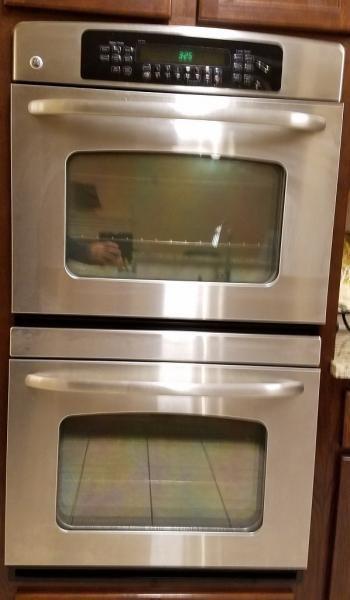
Credit: www.doityourself.com
Common Causes
Faulty wiring, power issues, or worn-out buttons can cause GE Profile oven buttons to stop working. Dirt or moisture buildup might also hinder button functionality, affecting your cooking routine. Regular maintenance can help prevent these common problems.
When your GE Profile oven buttons stop responding, it can be frustrating, especially when you’re trying to prepare a meal. Understanding the common causes behind this issue can help you troubleshoot effectively. Let’s delve into some of the typical reasons your oven buttons might not be working.Power Supply Issues
A faulty power supply is often the culprit behind non-responsive oven buttons. Check if your oven is properly plugged into the power outlet. Sometimes, a tripped circuit breaker can be the cause, so ensure that your electrical panel is in order. Did you know that power fluctuations can affect your oven’s functionality? Investing in a surge protector might save you from future headaches.Control Panel Malfunctions
The control panel is the brain of your oven. If it’s malfunctioning, your buttons won’t work. Look for signs like flickering displays or unusual beeping sounds. Have you ever noticed moisture or food particles around the control panel? These can cause malfunctions too. Regular cleaning and keeping the panel dry might prevent these issues.Button Wear And Tear
Over time, the buttons on your oven can wear out. Frequent use can lead to fading labels or buttons that stick. You might have to press harder than usual to get a response. Have you checked if any buttons feel loose or have sunken in? Simple maintenance like gently pressing each button to ensure they are responsive can extend their lifespan. Understanding these common issues can save you time and possibly a repair bill. Which of these causes resonates with your experience? Taking proactive steps can prevent your oven buttons from becoming a persistent problem.Initial Checks
Experiencing unresponsive buttons on your GE Profile oven can be frustrating, especially when you’re in the middle of preparing a meal. Before jumping to conclusions about needing a repair, it’s wise to conduct some initial checks. These basic steps might just save you time and money, and you might find a simple fix right at your fingertips. Let’s dive into some practical checks you can perform yourself.
Verify Power Connection
First and foremost, ensure your oven is properly connected to a power source. It might sound obvious, but sometimes we overlook the simple things. Check if the oven’s plug is securely inserted into the outlet. If you’ve recently rearranged your kitchen or cleaned around the appliance, the plug might have been dislodged.
Look at the power outlet itself. Try plugging in another device to verify that the outlet is working. A faulty outlet might be the culprit behind your oven’s unresponsive buttons. If the outlet is functional, your oven should power on without issues.
Inspect Circuit Breaker
Sometimes, electrical issues are not about the appliance itself but related to your home’s electrical system. Locate your home’s circuit breaker panel. Check if the switch for your kitchen or oven has tripped. A tripped breaker can cut off power to your oven, making the buttons unresponsive.
Flip the breaker switch off and then on again to reset it. You might wonder, why did the breaker trip? It could be due to a power surge or an overloaded circuit. Resetting it might bring your oven back to life, restoring functionality to those stubborn buttons.
Examine Button Condition
Take a close look at the buttons themselves. Are they sticky or obstructed? Kitchen environments can be messy, and sometimes food particles or grease can affect button functionality. Gently clean around the buttons with a slightly damp cloth, ensuring you don’t use excessive water.
Press each button individually to check if any are stuck or require extra pressure to respond. If you notice physical damage like cracks, it might be time to consider replacement parts. A seemingly minor issue could be the key to resolving your oven troubles.
These initial checks are straightforward yet effective. You’d be surprised how often a simple reset or cleaning resolves what seems like a complex issue. So, next time your GE Profile oven buttons act up, remember these checks. Who knows, you might just become the home troubleshooting expert among your friends!
Reset Procedures
Resetting your GE Profile oven can solve many button issues. Sometimes, the buttons stop responding due to minor glitches. Following reset procedures can often bring them back to normal. You will find two main types of reset methods: soft reset and hard reset. Each method serves a different purpose depending on the issue’s severity.
Soft Reset Steps
A soft reset is simple and quick. First, ensure the oven is plugged in. Press the ‘Clear’ button on the control panel. Hold it for 10 seconds. This clears minor errors and restores functionality. If the buttons still don’t work, try pressing ‘Start’ and ‘Stop’ together. Hold them for 5 seconds. This might reset minor glitches.
Hard Reset Instructions
A hard reset is more thorough. It involves turning off the power supply. Unplug the oven from the wall outlet. Wait for at least one minute. This helps clear any persistent errors. After waiting, plug the oven back in. Turn the circuit breaker off for a minute if unplugging is difficult. Then, switch it back on. The hard reset often resolves deeper issues with the buttons.
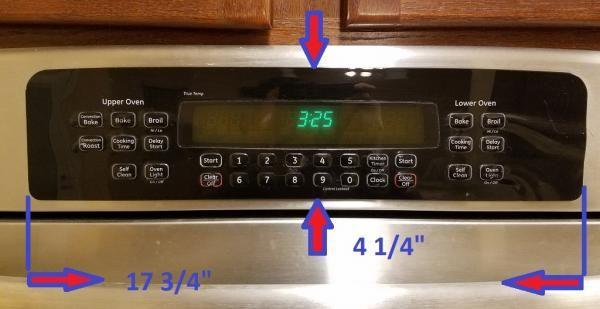
Credit: www.doityourself.com
Diagnostic Tests
Facing issues with your Ge Profile oven buttons can be frustrating. Understanding how to perform diagnostic tests can help identify the problem. This guide will walk you through built-in diagnostics and manual button testing. Both methods will assist in pinpointing issues with your oven buttons.
Using Built-in Diagnostics
Ge Profile ovens come with built-in diagnostic tools. These tools help detect faults with oven buttons. To access the diagnostics, start by checking the user manual. Follow the steps to enter the diagnostic mode. The oven will display error codes or button faults. Note these codes for troubleshooting. Built-in diagnostics save time and offer quick insights.
Manual Button Testing
Manual button testing involves checking each button individually. First, unplug the oven for safety. Then, press each button and observe their response. Check if some buttons are unresponsive or sticky. This method is straightforward and requires no special tools. Document any inconsistencies during the test. Manual testing helps identify specific faulty buttons.
Repair Options
When your GE Profile oven buttons stop working, you may feel like you’re stuck in a culinary rut. But don’t worry, there are several repair options to help you get back to cooking your favorite meals. Whether you’re a DIY enthusiast or prefer professional help, there’s a solution that fits your needs and budget.
Diy Repair Tips
Tackling the issue yourself can be both empowering and cost-effective. Start by checking the oven’s power source. Make sure it’s plugged in securely and the circuit breaker hasn’t tripped. Sometimes, a simple reset can solve the problem.
If the buttons are still unresponsive, inspect the control panel. Gently clean it with a damp cloth to remove any dirt or grease that might be interfering with the buttons. Be careful not to use excessive water, as it can damage the electronics.
Consider consulting the user manual. It might offer insights specific to your oven model. You might find a troubleshooting section that provides a step-by-step guide for resolving button issues. Have you ever fixed something simply by following the manual’s advice?
Professional Assistance
If DIY isn’t your style or the issue persists, it may be time to call in a professional. A trained technician can diagnose the problem accurately and offer solutions. They have the tools and expertise to handle complex repairs safely.
Choosing professional assistance ensures that you don’t accidentally worsen the problem. It can also save time. Imagine getting your oven back in top shape without lifting a finger. Wouldn’t that be a relief?
Research local appliance repair services. Read reviews and compare quotes to find a reputable technician. Sometimes, investing in a repair can prolong the life of your oven, making it a smart choice in the long run.
Have you faced a similar issue with your appliances? How did you tackle it? Share your thoughts below and help others in the community.

Credit: www.reddit.com
Preventive Measures
Preventing button issues in your GE Profile oven is important. Simple steps can help maintain its functionality. These measures ensure your oven remains reliable.
Regular Maintenance
Routine checks keep the oven in good shape. Start by cleaning the buttons with a soft cloth. Avoid using harsh chemicals. Check for any loose or damaged buttons. Tighten or replace them if necessary. Ensure the control panel is dust-free. Dust can interfere with button function.
Protection Against Moisture
Moisture can damage electronic components. Keep the oven area dry. Wipe spills immediately to prevent seepage. Use a cover or guard if necessary. Ensure the kitchen is well-ventilated. This reduces moisture buildup.
Frequently Asked Questions
How Do I Reset My Ge Profile Oven Control Panel?
Press “Clear” or “Off” on the control panel to reset the GE Profile oven. If needed, unplug the oven for five minutes. Then, reconnect and restart the oven to complete the reset process. Always refer to the user manual for specific instructions related to your model.
Why Are My Oven Buttons Not Working?
Oven buttons might malfunction due to power issues, faulty wiring, or damaged control panel. Check the power supply, inspect wiring for damages, and consider professional repair for the control panel. Regular maintenance can prevent these issues and ensure optimal performance.
Why Is My Ge Profile Oven Not Responding?
Your GE Profile oven might not respond due to electrical issues, faulty control board, or touchpad problems. Check power connections, reset the oven, and inspect for visible damage. If issues persist, consult the user manual or contact GE customer support for assistance.
Regular maintenance helps prevent such problems.
Why Did My Oven Control Panel Stop Working?
The oven control panel might stop working due to a power surge, faulty wiring, or a worn-out control board. Resetting the oven may help. If the issue persists, seek professional repair services to diagnose and fix the problem efficiently. Ensure proper maintenance to avoid future malfunctions.
Conclusion
Fixing oven button issues can be simple. Start with checking the basics. Power connection and settings matter. Also, inspect the control lock feature. Sometimes it’s just activated. Clean the buttons gently. Dust and grime often cause problems. If the issue persists, consider a professional.
They have the right tools and knowledge. Regular maintenance helps avoid future problems. A well-functioning oven means better meals. Keep an eye on small changes. They can indicate bigger issues. Your oven is important for your kitchen. Treat it with care.
Enjoy stress-free cooking with a fully operational oven.