

Is your Amana range oven button not working when you need it most? It’s frustrating when a simple button stops responding, especially in the middle of cooking.
You might feel stuck, unsure if it’s a quick fix or a costly repair. But don’t worry—this problem is more common than you think, and there are easy steps you can take to get your oven back in action. Keep reading to find out why your oven button might be failing and how you can solve it fast.
Common Reasons For Button Failure
The button on your Amana range oven might stop working due to several issues. Understanding these reasons helps to fix the problem faster.
Common causes include electrical problems, wear and tear, and internal faults. Each affects the button’s function differently.
Electrical Issues
Electrical problems often cause oven buttons to fail. Loose wiring or a blown fuse can stop the button from sending signals.
Power surges may damage the control board, making buttons unresponsive. Checking electrical connections is important for repairs.
- Loose or disconnected wires
- Blown fuse or circuit breaker
- Damaged control board from power surges
- Faulty electrical connectors
Button Wear And Tear
Frequent use can wear out the button’s surface and internal parts. Dirt and grime also cause buttons to stick or fail.
Over time, the button may lose its spring action or become cracked. This prevents it from pressing properly or sending signals.
- Worn or broken button surface
- Sticky or jammed buttons due to dirt
- Lost spring action inside the button
- Cracks or physical damage
Internal Component Problems
Inside the oven, small components connect the button to the control system. These parts can fail or disconnect over time.
Issues with circuit boards, sensors, or connectors can stop the button from working even if the button itself is fine.
- Faulty circuit board connections
- Broken or loose internal connectors
- Malfunctioning sensors linked to the button
- Damaged wiring inside the control panel
Simple Troubleshooting Steps
If your Amana range oven button is not working, try some easy steps first. These can fix common problems without tools.
Check the power and control panel before calling for service. Many issues are quick to solve at home.
Power Cycle The Oven
Power cycling the oven can reset the controls and fix button problems. It clears minor errors in the system.
Unplug the oven from the power outlet. Wait about one minute, then plug it back in. This restarts the oven’s control board.
Clean The Control Panel
Dirt, grease, or moisture can stop buttons from working. Gently clean the control panel to improve button response.
- Use a soft, damp cloth to wipe the panel.
- Avoid harsh cleaners or sprays directly on buttons.
- Dry the panel fully before use.
Check For Lock Or Child Safety Mode
The oven may have a lock or child safety mode active. This stops buttons from working to keep kids safe.
Look for a lock symbol on the display or control panel. Follow the manual to turn off the lock mode if needed.
- Press and hold the lock button for a few seconds.
- Check the user manual for specific lock release steps.
- Try pressing all buttons once after unlocking.
Advanced Fixes To Try
If the button on your Amana range oven is not working, there are some advanced fixes you can try. These steps go beyond simple checks and require careful inspection.
Start by looking at the internal parts that control the buttons. You may need tools and some skill to handle electrical parts safely.
Inspecting The Ribbon Cable
The ribbon cable connects the control panel to the oven’s main board. If it is loose or damaged, buttons may stop working.
Check the cable for any tears or bends. Make sure it is plugged in tightly at both ends. A bad connection can cause button failure.
- Turn off power before inspecting the cable
- Disconnect and reconnect the ribbon cable firmly
- Look for visible damage or corrosion
- Replace the cable if it looks worn or broken
Testing The Control Board
The control board manages the oven’s functions. A fault here can stop buttons from working. Testing the board helps find if it is the problem.
Use a multimeter to check for power and continuity on the control board. Look for burnt parts or signs of damage. Replace the board if tests fail.
- Unplug the oven before testing
- Check input and output voltages
- Inspect for burnt or cracked components
- Consider professional help for control board testing
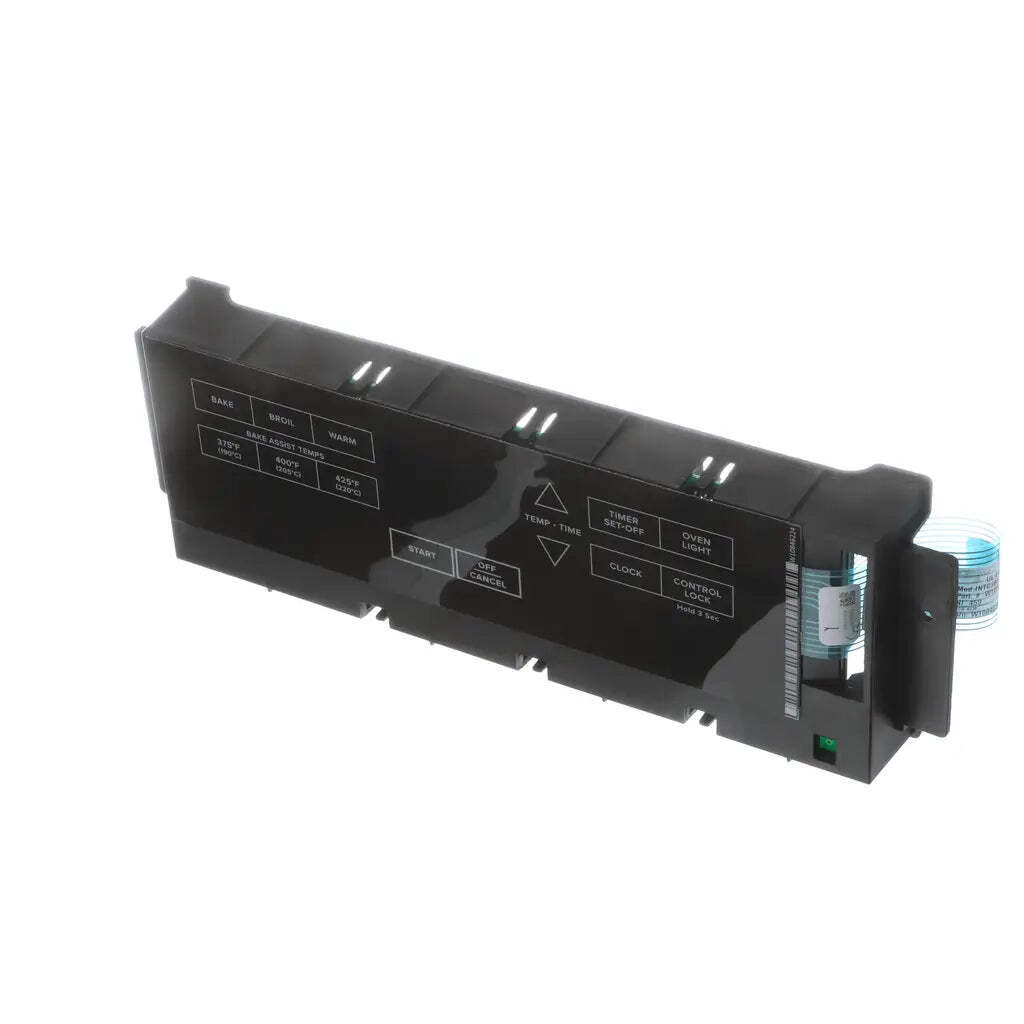
Replacing Faulty Buttons
If the button itself is broken, it needs replacement. Over time, buttons wear out or get stuck. New buttons restore proper function.
Remove the control panel carefully to access the buttons. Test the button with a multimeter before replacing. Match the new button to your model.
- Power off the oven before starting
- Remove screws to open the control panel
- Test button continuity with a multimeter
- Install a new button if the old one fails tests
- Reassemble the panel and test the oven

Credit: www.goemans.com
When To Call A Professional
If your Amana range oven button stops working, you may wonder what to do next. Some issues you can fix yourself. Others need a professional.
Knowing when to call a professional helps keep you safe and protects your oven from damage.
Safety Concerns
Electrical appliances can be dangerous if handled wrong. A broken oven button might cause sparks or short circuits.
Do not try to fix the oven if you smell gas or see smoke. Turn off the power and call a professional immediately.
Complex Electrical Repairs
Some repairs need special tools and knowledge. Oven buttons connect to complex circuits inside the range.
If the button wiring or control board is faulty, a professional should handle the repair. This avoids further damage or injury.
- Faulty wiring inside the oven
- Control board malfunctions
- Hidden electrical connections
Warranty And Service Options
Check if your oven is still under warranty before fixing it yourself. Some repairs can void the warranty.
Calling a professional authorized by Amana helps keep your warranty valid. They also use original parts for service.
Preventing Future Button Issues
Buttons on your Amana range oven can stop working if not cared for. Taking simple steps helps keep them working well.
Follow easy tips to avoid problems with your oven buttons. This saves time and repair costs later.
Regular Cleaning Tips
Dirt and grease can block buttons and cause them to stick. Clean your buttons often to keep them free and easy to press.
Use a soft cloth and mild soap. Avoid harsh chemicals that can damage the button surface.
- Turn off the oven before cleaning
- Use a damp cloth with mild soap
- Wipe buttons gently to remove grime
- Dry the buttons fully before use
Avoiding Excessive Force
Press buttons gently. Pushing too hard can damage the internal parts and cause failure.
Teach everyone in your home to use light pressure on the buttons. This helps keep them working longer.
- Press buttons with a fingertip
- Do not use sharp objects to press buttons
- Avoid banging or slamming the control panel
Scheduled Maintenance
Set regular checks for your oven buttons to find problems early. Fixing small issues stops bigger damage.
Call a technician if buttons feel sticky or don’t respond well. Timely service keeps your oven safe and working.
- Inspect buttons monthly for wear or damage
- Test all buttons to ensure they respond correctly
- Schedule professional maintenance yearly

Credit: www.youtube.com
Credit: www.ebay.com
Frequently Asked Questions
Why Is My Amana Oven Button Unresponsive?
Your Amana oven button might be unresponsive due to faulty connections or dirt buildup. Check for any loose wiring or debris. Cleaning the control panel with a soft cloth might help. If the issue persists, consider consulting a professional technician to diagnose and fix the problem.
How Do I Reset My Amana Range Oven?
To reset your Amana range oven, locate the circuit breaker and turn it off for a few minutes. Then, switch it back on. This can help in resetting the control panel. If the problem continues, refer to your manual or contact Amana support for further assistance.
Can A Power Surge Affect Oven Buttons?
Yes, a power surge can potentially damage the electronic components of your oven. This may result in unresponsive buttons. To protect your appliance, consider using a surge protector. If your oven was affected, you might need a professional to inspect and repair the damage.
What Should I Do If My Oven Buttons Are Stuck?
If your oven buttons are stuck, gently clean around the buttons with a damp cloth. Dirt or debris can cause them to stick. Avoid using excessive force, as this might damage the controls. If cleaning doesn’t help, professional repair might be necessary.
Conclusion
Fixing the Amana range oven button can save time and money. Simple checks often solve the problem fast. Cleaning the button or resetting the oven might help. Sometimes, a small part needs replacement. Always turn off power before trying repairs.
If the issue stays, calling a professional is smart. Keeping your oven in good shape prevents future issues. You can enjoy cooking without worries once the button works well again. Small steps lead to big fixes. Don’t let a broken button stop your meal plans.