

Is your Admiral gas stove oven not working right when you need it most? It’s frustrating when your oven won’t heat up or keeps shutting off unexpectedly.
You rely on your stove every day, and when it stops working, it disrupts your entire cooking routine. But don’t worry—you’re not alone, and there are simple steps you can take to fix it. Keep reading to discover the common reasons behind the problem and easy solutions that can get your oven back to cooking like new.
Your next meal is closer than you think!
Common Reasons For Oven Failure
An Admiral gas stove oven may stop working due to several common problems. Understanding these issues helps you know what to check first.
This guide explains the frequent causes of oven failure. It covers ignition, gas supply, thermostat, and electrical problems.
Ignition Problems
The oven may not light if the ignition system fails. This system creates the spark needed to start the flame.
Common ignition issues include dirty igniters, worn-out spark modules, or faulty igniter switches.
- Igniter covered with food or grease
- Igniter not producing a spark
- Loose or broken wiring to the igniter
Gas Supply Issues
If the oven does not get gas, it will not heat. The gas supply must be steady and strong.
Gas supply problems can come from closed valves, leaks, or blocked gas lines.
- Gas valve not fully open
- Gas line blockage or leak
- Low gas pressure from the supplier
Thermostat Malfunctions
The thermostat controls the oven temperature. If it breaks, the oven may not heat correctly.
Faulty thermostats can cause the oven to stay cold or get too hot.
- Broken thermostat sensor
- Loose thermostat wiring
- Incorrect thermostat calibration
Electrical Connection Faults
Electric parts in the oven need good connections to work. Bad connections cause failures.
Check for loose wires, blown fuses, or damaged circuit boards.
- Loose or disconnected wires
- Blown fuse or tripped breaker
- Damaged control board
Basic Safety Checks Before Repair
Before fixing your Admiral gas stove oven, check some safety points. These checks help avoid accidents and keep you safe.
Make sure to do these simple checks before starting any repair work on your stove oven.
Ensure Gas Supply Is On
Check if the gas supply valve is open. Without gas, the stove cannot work.
Look at the gas tank or pipeline to see if gas flows properly.
- Locate the main gas valve near your stove.
- Turn the valve counterclockwise to open it.
- Smell for gas to confirm supply is active.
Check Power Connection
Your gas stove oven may need electricity for ignition. Check if it is plugged in.
Inspect the power cord and outlet for damage or loose connections.
- Make sure the plug is fully inserted into the socket.
- Test the outlet by plugging in another device.
- Replace damaged cords or use a different outlet.
Ventilation And Gas Leak Detection
Good airflow is important when working with gas appliances. Check the kitchen ventilation.
Detect gas leaks by smelling or using a soap water test on connections.
- Open windows or turn on exhaust fans.
- Mix soap with water and apply to gas pipe joints.
- Look for bubbles showing a gas leak.
- If you detect a leak, do not repair yourself. Call a professional.
Quick Fixes For Ignition Issues
If your Admiral gas stove oven is not lighting, the igniter might be the problem. You can try some simple fixes before calling a technician.
These quick steps can help you solve common ignition issues safely and easily.
Cleaning The Igniter
Dirt and grease can stop the igniter from sparking. Cleaning it may fix the problem fast.
Use a soft brush or cloth to remove any buildup around the igniter. Make sure the stove is off and cool before you start.
- Turn off the gas and unplug the stove.
- Locate the igniter near the burner.
- Gently clean the igniter with a soft brush or cloth.
- Remove any food debris or grease.
- Let it dry completely before turning the stove back on.
Resetting The Ignition System
Sometimes the ignition system needs a reset to work again. This can clear any small glitches.
Resetting is easy and does not require tools. Just follow these steps carefully.
- Turn off the stove and unplug it from the power source.
- Wait for about 5 minutes to let the system reset.
- Plug the stove back in and turn on the gas supply.
- Try to ignite the burner again.
- If it still does not work, check other fixes.
Replacing The Igniter
If cleaning and resetting do not help, the igniter might be broken. Replacing it is the next step.
Buy the correct igniter model for your stove. Follow safety rules when replacing parts.
- Turn off the gas and unplug the stove.
- Remove the burner cover to access the igniter.
- Unscrew the old igniter carefully.
- Connect and screw in the new igniter.
- Replace the burner cover and test the stove.

Credit: www.reddit.com
Resolving Gas Flow Problems
If your Admiral gas stove oven is not working, gas flow problems might cause it. Gas must flow well for the stove to heat up.
Checking gas flow parts can fix the issue. This guide helps you inspect valves, check pressure, and clear blocked lines.
Inspecting Gas Valves
Gas valves control the flow of gas to your stove. If valves are closed or stuck, gas cannot reach the burner.
Look for damage or dirt on the valves. Turn valves fully open and closed to see if they move smoothly.
- Make sure valve handles are not broken
- Check for rust or corrosion around valves
- Clean valves gently if dirt is visible
Checking Gas Pressure
Gas pressure must be right for your stove to work. Low or high pressure stops the oven from heating properly.
Use a pressure gauge to measure the gas pressure. Compare the reading with the stove’s manual for correct levels.
- Connect a gas pressure gauge to the stove line
- Turn on the stove and read the gauge
- Adjust the regulator if pressure is too high or low
Clearing Blocked Gas Lines
Gas lines can get blocked by dirt or debris. Blocked lines stop gas flow and prevent the oven from working.
Turn off the gas supply before cleaning. Use a flexible brush or compressed air to clear the lines carefully.
- Disconnect the gas line from the stove
- Use a pipe cleaner or soft brush inside the line
- Blow compressed air through the line to remove debris
- Reconnect the gas line and test the stove
Addressing Thermostat And Temperature Problems
An Admiral gas stove oven may not work properly if the thermostat or temperature parts fail. These problems cause wrong oven temperatures or no heat at all. Fixing these issues helps your oven cook food well and safely.
Check the thermostat and temperature sensors to find the problem. Sometimes you can fix the issue by calibrating or replacing parts. This guide explains how to handle these common problems.
Calibrating The Thermostat
The thermostat controls the oven temperature. If it is not accurate, the oven may get too hot or too cold. You can calibrate the thermostat to fix this problem.
Use an oven thermometer to check the real temperature inside the oven. Compare it to the set temperature. Adjust the thermostat if the temperatures are different.
- Turn the oven on and set a temperature.
- Place an oven thermometer inside and wait 15 minutes.
- Note the thermometer reading.
- Adjust the thermostat screw to match the thermometer if needed.
- Test again to confirm accuracy.
Testing Temperature Sensors
Temperature sensors tell the oven control board how hot the oven is. A faulty sensor can stop the oven from heating correctly. Testing sensors helps find if they need replacement.
Use a multimeter to check the sensor’s resistance. The reading should match the oven’s manual at room temperature. If the sensor shows no reading or a wrong value, it is broken.
- Turn off power to the oven.
- Remove the temperature sensor from the oven.
- Set the multimeter to measure resistance (ohms).
- Measure the sensor’s resistance at room temperature.
- Compare the reading with the manual’s normal value.
- Replace the sensor if the reading is wrong or zero.
Replacing Faulty Components
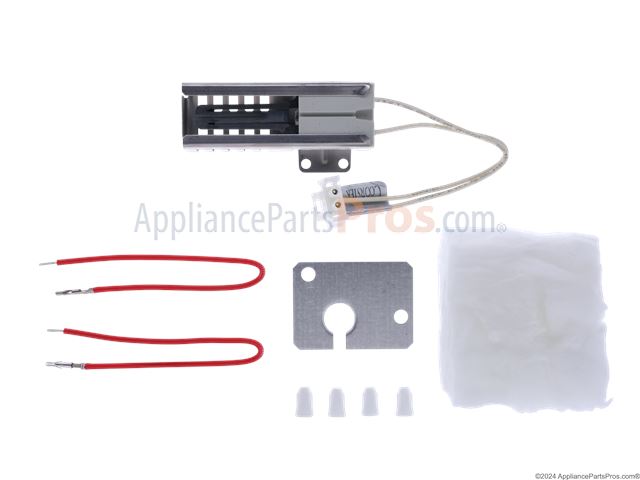
If calibration or testing shows broken parts, replace them. Common parts to replace include thermostats, temperature sensors, and control boards. Using the right parts is important.
Turn off power and gas supply before replacing parts. Remove the faulty component carefully. Install the new part following the oven’s manual. Test the oven after replacement.
- Turn off power and gas supply.
- Remove access panels to reach parts.
- Disconnect wires from the faulty part.
- Remove the broken component.
- Install the new part in the same position.
- Reconnect wires and secure panels.
- Turn on power and gas.
- Test the oven’s heating and temperature control.
Credit: www.appliancepartspros.com
Electrical Troubleshooting Tips
When your Admiral gas stove oven stops working, electrical problems might be the cause. Checking electrical parts can help you find the issue fast.
This guide gives simple tips to check the wiring, fuses, circuit breakers, and control board safely.
Examining Wiring And Connections
Loose or damaged wires can stop the oven from working. Look behind the stove for any wires that are unplugged or broken.
Make sure all connections are tight and clean. Dirt or rust on wires can block power flow.
- Unplug the stove before checking wires
- Look for frayed or burnt wires
- Secure any loose wire connections
- Clean dirty or rusty connectors
Checking Fuses And Circuit Breakers
Fuses and circuit breakers protect your stove from electrical surges. A blown fuse or tripped breaker can stop the oven from working.
Check your home’s fuse box to see if any fuse is blown or breaker is off. Replace the fuse or reset the breaker if needed.
- Turn off the stove before checking fuses
- Replace blown fuses with the same type
- Reset tripped breakers by switching off then on
- Call a professional if breakers keep tripping
Resetting The Control Board
The control board manages the oven’s functions. Sometimes it needs a reset to fix minor errors.
To reset, unplug the stove from power for a few minutes. Then plug it back in and try using the oven again.
- Unplug the stove from the wall outlet
- Wait 3 to 5 minutes before plugging back in
- Check if the oven powers on and works
- Contact service if the problem continues
When To Call A Professional
If your Admiral gas stove oven stops working, you might wonder if you can fix it yourself. Some small issues are easy to handle. But some problems need a trained expert to keep you safe and fix the stove right.
Calling a professional helps avoid accidents and saves time. They have the tools and knowledge to find the real problem and fix it correctly.
Complex Gas Line Repairs
Gas lines are very dangerous to work with. If the gas stove oven has a leak or the gas does not reach the burners, do not try to fix the lines yourself. Only a professional can safely check and repair gas pipes.
Gas leaks can cause fires or explosions. Professionals use special tools to find leaks and fix them. They also know how to follow safety rules to protect your home.
Electrical Component Replacement
Modern Admiral gas ovens have electrical parts like igniters and control boards. If these parts fail, the oven may not work or may be unsafe. Fixing or replacing these parts needs skill with electrical work.
Calling a professional ensures the right parts are used. They also make sure the electrical system is safe and the stove works correctly after repair.
Warranty And Service Support
Your Admiral gas stove oven may still be under warranty. Trying to fix it yourself can void the warranty. It is best to call a professional authorized by the manufacturer.
Authorized service centers have trained technicians. They follow the manufacturer’s rules and use original parts. This keeps your warranty valid and protects your stove.
Maintenance Tips To Prevent Future Issues
Admiral gas stoves with ovens can work well for years. Proper care helps avoid problems. Regular maintenance keeps your stove safe and efficient.
Follow simple steps to keep your stove oven working smoothly. These tips help prevent common issues and extend its life.
Regular Cleaning Schedule
Clean your stove and oven often to stop dirt buildup. Grease and food crumbs can block burners and vents. This causes poor performance or safety risks.
Wipe spills right after cooking. Deep clean the oven and burners once a week. Use mild soap and a soft cloth. Avoid harsh chemicals that can damage parts.
- Clean burner caps and grates with warm water
- Remove crumbs from oven trays and floor
- Use a soft brush for burner holes
- Dry all parts completely before use
Routine Component Inspection
Check your stove oven parts regularly. Look for signs of wear, rust, or damage. Catching issues early stops bigger problems.
Inspect gas connections and valves for leaks or cracks. Test ignition systems to ensure they spark easily. Replace faulty parts right away to keep your stove safe.
- Examine burner flames for color and strength
- Check oven door seals for tight closure
- Look over knobs and control switches
- Test safety features like automatic shut-off
Safe Usage Practices
Use your Admiral gas stove oven carefully. Follow safety rules to avoid damage and accidents. Proper use reduces wear and tear on parts.
Do not leave the stove unattended while cooking. Always turn off the gas after use. Avoid placing heavy pots on oven doors to prevent bending.
- Light burners with matches only if automatic igniter fails
- Keep flammable items away from stove
- Do not block oven vents during use
- Use cookware that fits burner size

Credit: www.reddit.com
Frequently Asked Questions
Why Is My Admiral Gas Stove Not Igniting?
If your Admiral gas stove isn’t igniting, check the power connection first. Ensure the gas supply is turned on. Clean the burner ports as they might be clogged. A faulty igniter could also be the culprit. If these steps don’t help, consider consulting a professional technician for further inspection.
How Do I Reset My Admiral Gas Oven?
To reset your Admiral gas oven, disconnect it from the power source. Wait for a few minutes before plugging it back in. This may resolve minor glitches. If the issue persists, consult the user manual for specific reset instructions or contact customer support for guidance.
What Causes An Admiral Oven To Not Heat?
If your Admiral oven isn’t heating, check the thermostat settings. Ensure the gas supply is active. Faulty igniters or heating elements might be the issue. Inspect the gas valve to ensure it’s not malfunctioning. If problems continue, professional repair might be necessary.
How To Clean Admiral Gas Stove Burners?
To clean Admiral gas stove burners, remove them from the stove. Soak them in warm, soapy water to loosen grime. Use a soft brush to scrub away debris. Rinse and dry thoroughly before reassembling. Regular cleaning prevents clogs and ensures efficient performance.
Conclusion
Fixing an Admiral gas stove oven can feel tricky. Small checks often solve common problems fast. Always ensure the gas supply is open and clean. Keep the oven knobs and ignition clean and dry. Safety matters most—turn off gas before any repair.
Regular care helps your stove last longer. Stay calm and follow simple steps carefully. A working stove makes cooking easier and more fun. Don’t delay fixing issues to avoid bigger troubles later. Simple actions bring your stove back to life.